
Multi-chain assets
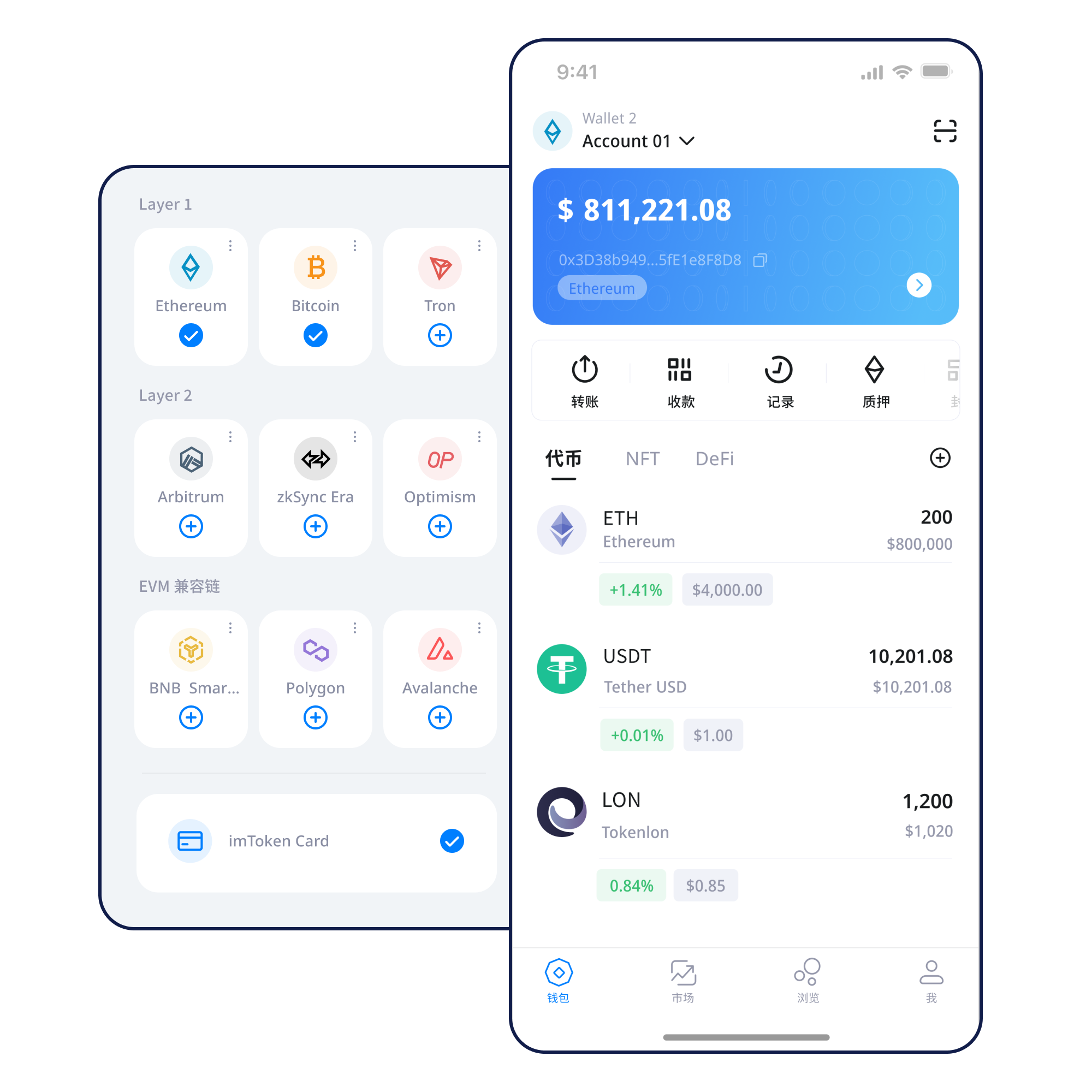
Each blockchain has its own network state, gas model and contract deployments. When checking an asset, review its network and contract context as well as the token name.
Understand multi-chain networks →
imtoken multi-chain wallet
A multi-chain wallet, blockchain network and Web3 knowledge hub from imtoken
Move from multi-chain assets and network selection to sending, receiving, DApp connections, token approvals and wallet security in one coherent workflow. Every transfer, signature and approval deserves a review of the address, network and request details before you proceed.
Common tasks
Understand what a seed phrase and a private key control before creating a new blockchain account.
See the steps →Keep recovery information offline and avoid screenshots, cloud sync and chat messages for sensitive data.
Backup principles →Verify the address and network together rather than checking only a few visible characters.
Receiving guide →Review the address, network, amount and gas, then use the transaction hash to check the result.
Transfer checks →A connection is not blanket consent. Review every later signature and approval independently.
Connection guide →Wallet capabilities
Each blockchain has its own network state, gas model and contract deployments. When checking an asset, review its network and contract context as well as the token name.
Understand multi-chain networks →Receiving starts with the address and network. Sending adds amount, gas and post-transaction verification through the transaction hash.
Review the transfer flow →Review assets, switch networks, prepare transactions and access DApps on mobile while keeping the device and network environment trustworthy.
Browser use centers on account requests, domain checks, approval review and disconnecting sessions you no longer need.
Explore web connections →
Seed phrases and private keys remain under the user’s control. Official staff will not ask for them or for a verification code.
Open the security center →Matching token names do not imply matching network state. Verify the source network, destination network and address support before moving assets.
Multi-chain guide →
Understanding broadcast, inclusion and confirmation helps separate “submitted by the wallet” from “confirmed by the network.”
Public chain basics →
Similar address formats do not make assets automatically interchangeable. Gas assets, contract addresses and network parameters still need separate checks.
EVM guide →
Moving assets can involve bridges, waiting periods and multiple confirmation stages. A balance change alone may not describe final settlement.
Layer 2 basics →Fees influence processing conditions, while confirmations describe where the transaction sits in network history. Use the transaction hash and network state when troubleshooting.
Gas & confirmations →Wallet journey
Use the website download entry point intentionally and avoid installation files from unknown sources.
Know whether you are creating a new account or restoring an existing one, and never submit a seed phrase to a web form.
Keep recovery information offline rather than leaving long-lived screenshots or chat copies.
Check the network name, gas asset, address and application support before acting.
Verify address, network and amount before sending; a small test can be useful when uncertainty remains.
Use the transaction hash to inspect results and periodically review DApp permissions you no longer need.
Web3 & DApps
Check the full DApp domain before connecting. Once connected, examine account requests and treat message signatures, transaction signatures and token approvals as distinct actions with different consequences.
Connecting a wallet does not mean every signature request should be accepted. Review every signature and approval independently.
Security
Wallet security goes beyond protecting one password. Seed phrases and private keys control accounts, DApp approvals can leave long-lived permissions, and phishing pages or fake support messages often rely on urgency. Use one process that includes offline backup, domain verification, approval review, address and network checks, and a trusted device environment. imtoken staff will not ask for a seed phrase, private key or verification code and cannot restore a user’s private key. Because on-chain transactions generally cannot be reversed by a wallet alone, the most important checks happen before signing or sending.
Open the security center →Academy
Start with addresses, seed phrases and private keys, then add networks, gas, transaction hashes, DApps and approvals. Learning them in the same order that real actions happen makes it easier to know when to check a network, when to inspect a permission and when to stop.
Start learning →Ethereum & PoS
Learn Ethereum PoS, validator duties, reward sources, network status, withdrawals and exits. Staking does not guarantee returns; rewards can change and exits can involve waiting.
Staking basics →Product & security updates
FAQ
No. Seed phrases and private keys should stay under the user’s control, and official staff will not ask for them.
At minimum, review the complete address, destination network, amount and gas, and make sure the action matches your intent.
No. A connection only establishes interaction. Every later signature, transaction and approval request should be reviewed separately.
It lets you inspect whether a transaction was broadcast, confirmed, failed or is still pending on the relevant network.
No. Layer 2 systems use specific settlement or bridging mechanisms, so transfers and confirmations follow the rules of the networks involved.
No return is guaranteed. Rewards can change and staking can involve waiting, network penalties, contract risk and asset-price volatility.
imtoken